From Arduino to HR Compliance: Building a Smart Access Control System
In the modern business world, traditional keys are a relic. They are insecure, difficult to manage, and offer zero data. But what if your company’s door wasn’t just an entryway, but a smart ‘terminal’ that enhances security, tracks attendance, and automates your HR processes?
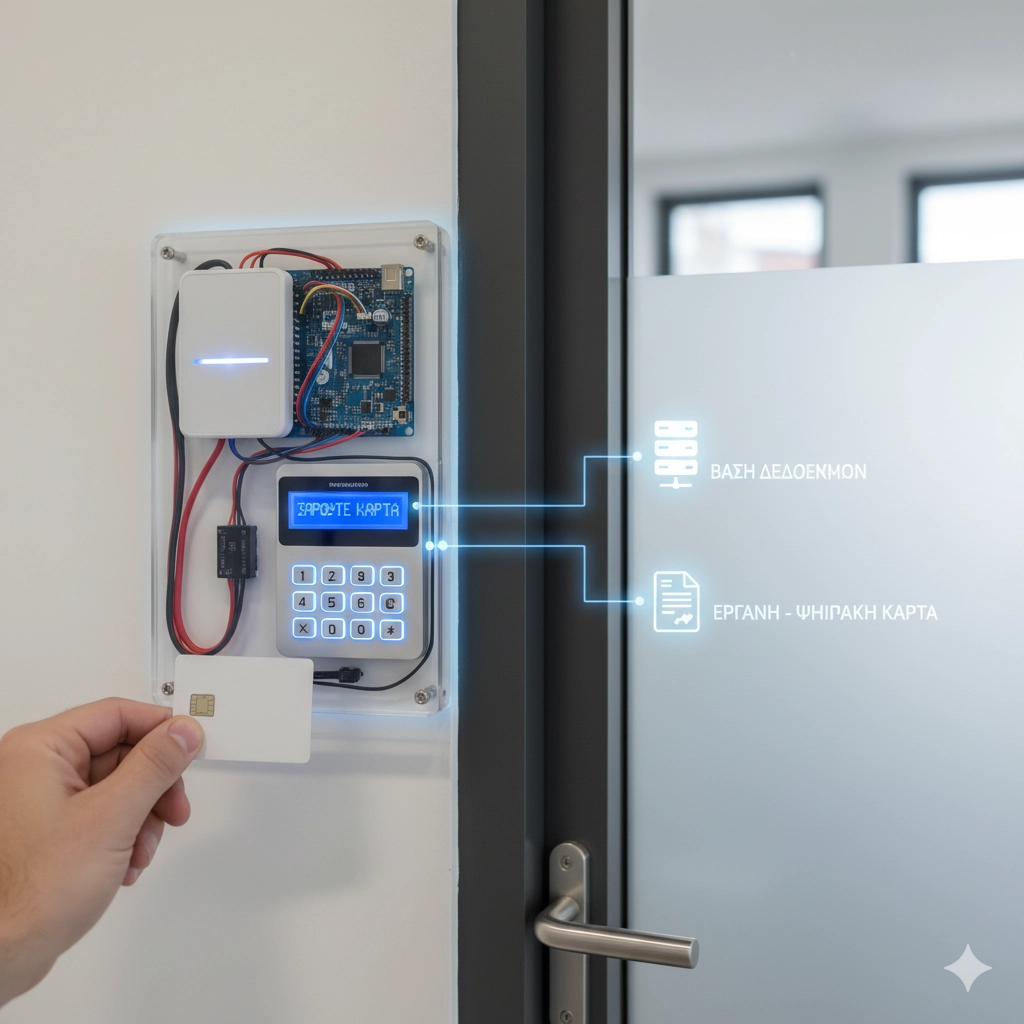
As a company specializing in professional tailor-made software development and business automation, we’re often called upon to turn everyday objects into powerful business tools. Today, we’ll break down how we design a modern, networked Access Control system that connects physical hardware (like Arduino) directly to critical back-end systems, like your central HR and payroll platforms.
The Building Blocks: From Hardware to Software
Creating a robust system requires the right components. Each plays a distinct role in the solution’s overall architecture.
- The Brain: Arduino (or a similar Microcontroller) This is the operation’s brain. We choose platforms like Arduino (or more professional-grade solutions like an ESP32 or Raspberry Pi for networking needs) because of their flexibility. This microcontroller manages all the peripherals and executes the core logic: “Who is allowed in, and when?”
- The Input Methods: NFC Reader & Numpad Why choose one method when you can have two?
- NFC Reader: Provides quick, easy access via cards or key fobs. Each card has a unique identifier (UID).
- Numpad: Adds a second layer of security (two-factor authentication). A user might be required to scan their card and enter a personal PIN.
- The Interface: 4×24 LCD Screen User communication is critical. A simple 4-line, 24-character LCD screen is perfect for providing clear instructions (“SCAN CARD,” “ENTER PIN”) and feedback (“WELCOME,” “ACCESS DENIED”).
- The “Lock”: Relay The relay is the electromechanical switch. When the Arduino gives the “OK” command, the relay closes a circuit, providing power to the door’s electric strike or magnetic lock, allowing it to open.
- The Memory: Central Database Here lies the heart of the “smart” solution. Instead of storing authorized users in the Arduino’s local memory (which is impractical and insecure), the system connects to centralized custom web applications and platforms running on a secure network. This back-end infrastructure holds the master user list, their time-based permissions, and encrypted PIN codes.
The Automation Flow: How It All Connects
Let’s look at the step-by-step process from a programming and automation perspective:
- Idle State: The LCD shows “Welcome. Please scan your card.”
- Scan: A user presents their NFC card.
- Query: The Arduino doesn’t make the decision locally. It reads the card’s UID and sends it (via Ethernet or Wi-Fi) to a central server.
- Database Check: The server checks the UID against the database to see if the user exists and is active, or if a PIN is required. By pairing this validation process with advanced AI and machine learning solutions, the system can instantly flag anomalous behavior, such as a single card being scanned at two different locations simultaneously.
- Response:
- If PIN is required: The LCD displays “Enter PIN.” The Arduino collects the digits from the Numpad and sends them for verification.
- If no PIN is required: The server sends an “APPROVE” command.
- Execution: The Arduino receives the “APPROVE” command, activates the relay for 5 seconds, the door unlocks, and the LCD displays “Welcome, [User Name].”
The Real Innovation: Connecting to Your HR & Payroll System
So far, we’ve built an excellent access control system. But the true business value lies in interoperability. This is where automation transforms the HR department.
The entry event is no longer just a physical door opening; it is an attendance declaration (check-in). When the server verifies a user, it doesn’t just send “APPROVE” back to the hardware. Through intelligent automation and API integration, it automatically creates a timestamp and pushes that event directly into your core HR or Payroll platform.
The Benefits of this Automation:
- Pinpoint-Accurate Time Tracking: The entry time (and corresponding exit time, using a second reader) is recorded the moment it happens, eliminating manual timesheets or forgotten “punch-ins.”
- Payroll Automation: The time-tracking data is ready and reliable, dramatically simplifying the calculation of wages, overtime, and leave.
- Full Compliance: The business remains 100% compliant with modern labor reporting requirements (such as the Digital Work Card initiative), with zero manual intervention required from the HR department. Managers can easily audit logs and manage employee shifts via dedicated mobile and desktop apps.
The Conclusion: It’s Not Just DIY, It’s a Smart Solution
What starts as a clever hardware prototype quickly scales into an integrated, business-critical system. The difference between a simple tech gadget and a true corporate asset is the ability to connect multiple, disparate systems—door hardware, a user database, and corporate HR platforms—to function as one unified, automated whole.
Is your business still relying on physical keys and manual timesheets? Let’s talk about how smart automation can unlock your operational efficiency.